
.png)



Do you get overwhelmed trying to respond to reviews? Do you wish there was an easier way to manage them so that other important tasks don’t slip through the cracks? If you answered ‘yes’ to either of these questions, you’re not alone.
Our new and improved AI Reply Assistant helps you respond to reviews 3x faster (and makes your day that little bit easier).
For small hotel operators, it streamlines the review management process, allowing you to focus on providing exceptional guest experiences.
Meanwhile, chain hotels can use AI Reply Assistant to maintain a consistent brand voice across all locations, ensuring that every guest feels heard and valued, regardless of where they stayed.
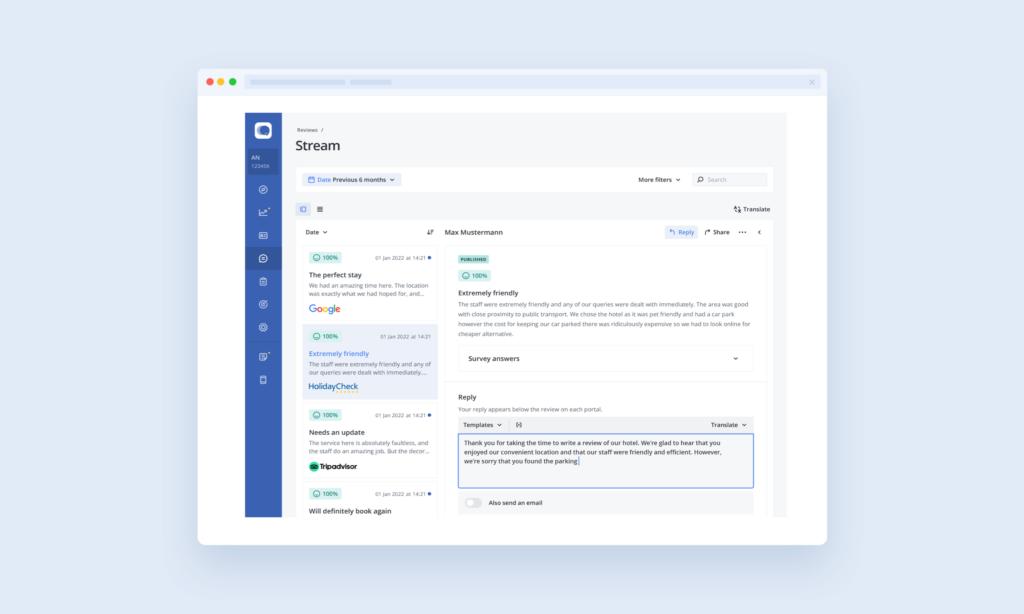
Available as an upgrade to our Review Stream, AI Reply Assistant uses artificial intelligence (AI) to generate unique, personalised and instant replies to your reviews. Just click a button, and the AI will take care of the rest.
First, the AI analyses the review, identifies key points and conducts sentiment analysis to determine which topics are positive or negative. Next, the AI tool crafts a tailored reply to the review based on this analysis.
Since the AI response generator is designed to create unique replies, you no longer have to rely on copy-and-pasting generic responses.
Each reply is also tailored to the review, ensuring that every customer feels heard and valued, regardless of whether their feedback is positive or negative.
With this powerful AI tool, you can effortlessly enhance your customer engagement and maintain a strong online reputation. Watch the video below, or dive into our 2-minute interactive tour to see it in action.
For more on maintaining a strong online presence, read our article on online reputation management.
Let’s say you received the following, fairly in-depth review:
“A gem in the city centre. Very bright airy and stylish. Spotlessly clean. Within 5 mins of tram, bus and metro lines it was so handy to get around.
Comfortable beds and excellent room service. The breakfast was very good my only complaint was the induction hob didn’t heat the scrambled egg or sausages enough they were cold.
What made our trip amazing was the quality of the staff they were so friendly, happy and helpful, they couldn’t do enough to help and make us feel welcome.”
Here’s an example of how AI Reply Assistant might respond to this review text:
“Thank you for your lovely review of our hotel! We’re so glad to hear that you enjoyed your stay with us and found our location to be convenient for getting around the city.
We’re sorry to hear that you weren’t satisfied with the temperature of the food at breakfast, and we’ll be sure to pass on your feedback to our team.
We’re thrilled to hear that you found our staff to be friendly and helpful – they really are the heart of our hotel! We hope you’ll come and stay with us again soon.”
With this response, the AI review response generator:
Plus, it did all this in just a couple of seconds.
At Customer Alliance, we’re always working to make review management easier for you. Here are some of the latest updates we’ve made to AI Reply Assistant (as of October 2024), ensuring your responses are even more effective and aligned with your business needs.
We noticed that some responses were either too short or too long compared to the reviews they addressed. For example, a brief, one-sentence review might have received an overly detailed reply, while a long, thoughtful review could have been met with a shorter, less engaging response. This mismatch could make your replies seem out of place.
Now, your responses are tailored to match the length and depth of the review. This improvement ensures your replies feel more natural and appropriate, making it clear to customers that you genuinely value their feedback—whether they’ve left a quick comment or a more comprehensive review.
We’ve listened to your feedback and updated our AI Reply Assistant to give you more control over how you address your reviewers.
In the past, you might have encountered generic terms like “customer” in responses, which may not match your particular business. Now, during setup, you can choose how you want to address your reviewers (like "guest" for hotels or "patient" for healthcare).
If a review includes the reviewer’s name, the AI will use it for a more personal touch. However, if the name looks like a username (e.g., Maria2942), it will default to the term you’ve chosen during setup, ensuring that responses always sound professional.
This enhancement keeps your communication authentic and ensures your brand’s voice shines through in every interaction.
For businesses operating in multiple languages, clear communication is essential.
We’ve improved how our AI handles greetings in our most-used languages: English, German, French, Italian, Polish, and Spanish.
Previously, there were occasional errors, particularly in languages where greetings change based on gender. We’ve resolved these issues, ensuring that your replies are grammatically correct and professional in every language.
This improvement allows you to maintain your brand’s voice consistently across different markets without worrying about awkward translations.
Keeping up with reviews can be a daunting task, especially if you don’t have the resources to hire an employee dedicated to responding. This is where AI Reply Assistant comes in. With this tool, you can instantly respond to customer reviews and enjoy a host of benefits. Let’s take a look at a few
Rather than having to sit and type out a response, AI Reply Assistant gives you an instant reply that sounds as if it were written by a human. This saves you tons of time as you aren’t starting from a blank page and having to come up with something new for every response.
By giving you the ability to quickly reply to your reviews, the AI tool frees up more of your work week for other tasks and goals. That’s a win-win in our book.
People appreciate being listened to, and reviews are a great way to get customer feedback. If your reviews get a proper response from you, it not only shows that you value their feedback, but research has also shown that it can boost customer satisfaction ratings over time. (1)
AI Reply Assistant makes this a simple process by automatically responding to reviews with a personalised message that’s unique to that review. Combining automation and a human touch is the perfect way to make sure each customer feels heard and that you take their feedback seriously.
To learn more about improving customer satisfaction, explore our resources on customer satisfaction metrics.
Responding to online reviews helps you appear more prominently in Google search results. This means more eyes on your reviews and awareness of your brand. Today, most customer journeys start online, and so being one of the first results people see can have a huge impact on your business.
Want to learn more? Take a look at our article: Reviews And SEO: How To Get More Clicks And Show Up On The First Page Of Google
By making it easy to reply to every review, AI Reply Assistant helps you stand out from the crowd and make a great first impression of your company. Why? A huge 75% of businesses don’t respond to negative reviews (even though more than half of people expect a reply within one week!) (2)(3)
When you reply to reviews manually, it can be hard to do so on a consistent basis. But using AI Reply Assistant makes it easy to keep up with every review and reply to each one in a timely manner. This not only improves your relationship with your existing customers, but also shows anyone who finds you online that you truly care about what your customers have to say.
Using AI Reply Assistant to respond to reviews helps save time and streamline your review management process. However, to get the best results there are a few things to keep in mind.
While AI is smart, it’s not always perfect! For that reason, you should always read through your review reply before hitting send and check the following:
If you do need to make some changes, edits couldn’t be simpler. Alter the review in the text box, just as you would if you’d written it yourself.
Following these simple best practices will help you make the most out of AI Reply Assistant and get the most impactful, efficient replies to your reviews.
Question not answered here? Get in touch and we'll be happy to help.
A: AI Reply Assistant is ideal for neutral, positive and negative reviews. Here’s another review example:
“No storage in the room, at all. No wardrobe with doors, no drawers on the desk neither on both bedside tables, so no place to store any private belongings throughout our stay. Just the safe, which obviously is very tiny and not meant to have underwear or medicines in it, for example.
Beds are so so so so bad, and my spine was totally wrecked after 4 nights.”
And how AI Reply Assistant could respond:
“I am sorry to hear that you were not satisfied with your stay with us. I can understand how not having any storage space in the room could be inconvenient, and I apologize for the discomfort our beds may have caused you. We will do our best to improve in these areas in the future. Thank you for bringing these issues to our attention.”
As you can see, AI Reply Assistant generates the same consistently high-quality responses and professional tone, no matter what kind of review it replies to.
A: While free AI tools like ChatGPT or basic AI review response generators can create simple replies, AI Reply Assistant offers advanced features that make your responses more personalised, efficient, and on-brand. Here are the key ways it stands out:
One of the main features that sets AI Reply Assistant apart is Smart Snippets. This allows you to "teach" the AI how to respond to recurring topics like “expensive parking” or “great vegan options.” Whenever these issues or compliments appear in a review, the AI will automatically integrate your tailored response. Unlike free tools, which often generate generic replies, Smart Snippets ensure each response feels specific and relevant to the customer’s feedback.
You can customise the tone of voice that your AI-powered tool uses when replying to reviews. Whether you prefer a formal, friendly, or conversational tone, the AI will adapt to ensure that your responses to reviews consistently reflect your brand’s personality. Free AI tools typically don’t offer this level of flexibility.
These customization options allow you to maintain your brand voice and ensure that every response feels authentic and aligned with your company’s values.
A: Technically, you could. But here’s why AI Reply Assistant is better:
A: You absolutely should. That’s why you have the chance to read and edit every AI response before you hit “send”, keeping that all-important human touch and making sure your brand voice is heard loud and clear.
A: No we don’t, and for one really good reason. We want to make it as easy and stress-free as possible to reply to your reviews.
By pairing AI Reply Assistant with our Review Stream, you can respond to all your reviews, from all different platforms, in one place. That means no copy-pasting, no switching back and forth between tabs and even more time that you can get back.
A: While using templates for replies may seem convenient, it often leads to generic responses that lack personalization and can feel repetitive. Customers can quickly spot when replies are the same across different reviews, which can diminish their perception of your brand and lead to a disengaged audience.
AI Reply Assistant goes beyond standard templates by utilizing advanced sentiment analysis and Smart Snippets to craft unique replies and make sure the responses are tailored to each customer's feedback. This approach not only enhances customer engagement and shows customers you value their feedback, but also ensures that your responses reflect your brand’s voice.
No matter the size of your hotel, using AI Reply Assistant will allow you to streamline customer interactions, enhance the customer experience, and build lasting relationships with guests.
By providing thoughtful, personalised responses to reviews (whether positive or negative), you can ensure that every customer feels heard and valued, while also driving customer retention.
Want to see the impact firsthand? Claim your free 15-minute introductory chat to explore how this tool can simplify your review management.
Sources:
Content updated October 2024
See how AI insights, automated workflows, and unified dashboards can reduce manual work and increase satisfaction across your hotel.
get personalized demo


